Why the NAS fans ran at 85% for a month
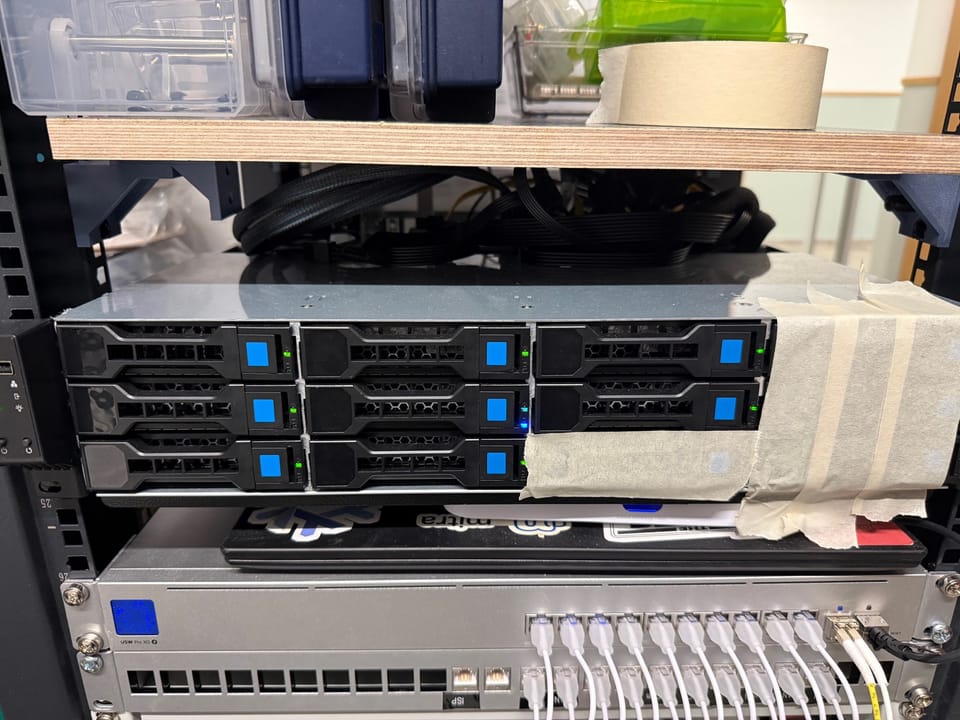
The NAS drives its chassis fans off the hottest disk instead of the mainboard’s BIOS curve, which reads CPU temperature and knows nothing about the drives. That is the right way round for a box whose only real heat source is ten spinning disks.
It also gives one disk a veto over the whole chassis. For about a month, one of them used it.
The fans had been pinned at 85% duty, roughly 3300 rpm, without moving. avg_over_time(pwm1[24h]) returned exactly 216 of 255 at every offset out to 30 days.
The curve steps to 85% at 55°C and steps back down only once the hottest disk is 2°C clear of that boundary. The hottest disk lived between 53 and 55°C. It went up once and never came back.
Ten drives, fifteen degrees apart
Two disks sat at 53–56°C, the other eight at 41–48°C, with the array measured at 0 sectors/s over 30 seconds. Same model, same firmware, same hours:
WD101EFBX-68B0AN0  fw 85.00A85  poh=10201  56°C
WD101EFBX-68B0AN0  fw 85.00A85  poh=10201  48°C
Both were ex-RAID members racked on the same day, both idle, 8°C apart. That leaves position.
Both hot disks sat on the first lane of their backplane cable — the same slot in two different rows.
24 Sep, fans 85%, board 33°C

        col1   col2   col3   col4
row1     43     41     43     55
row2     45     44     46     56
row3     42      -      -      -
You cannot ask the backplane, but you can make a disk answer
There is no SES on this backplane. Per the datasheet the trays carry yellow = power and blue = disk access, and nothing else: no locate LED, no SGPIO decode. ledctl has nothing to address, so the usual “light up bay 4” does not exist here.
The blue LED still works. It just is not addressable — so address the disk instead. A steady stream of cache-bypassing reads makes one tray blink in a rhythm you can pick out of a rack at a glance:
timeout 120 sh -c 'while :; do
  dd if=/dev/sdX of=/dev/null bs=4M count=64 iflag=direct
  sleep 0.5
done'
Read-only, first 256 MiB, iflag=direct so every burst reaches the platter instead of the page cache. That is how I found the disk that was still the hottest one after the move: square in the middle of the cage, surrounded on all four sides.
Bay numbering is the part that stays unsolved by that trick. The numbers come from HBA lane order, which is not the same as physical order. Pulling one disk settled that:
mpt3sas_cm0: enclosure logical id(0x5000…), slot(3)That tray was physically leftmost. So lane 0 is the rightmost column, and the hot column is the one furthest from the fans. Three 80 mm fans cover 240 mm of a cage four 3.5” drives wide. The fourth column sits outside the fan footprint.
Shutdown, two trays moved into the empty bottom row, tape over the openings.

25 Sep, fans 70%, board 34°C

        col1   col2   col3   col4
row1     48     45     42    blank
row2     51     52     46    blank
row3     49     51    blank  blank
Maximum 56 → 52°C, spread 15°C → 10°C.
The cage did not get cooler overall. Moving the disks spread the heat instead of removing it, and some of the rise in columns one and two is the fans having already stepped down from 85% to 70% between the two readings. What changed is that no single disk is pinned at the top, and the top is what the curve reads.
Blanking is not optional. Leaving the two vacated bays open gave the air a free path through the dead column, and a disk two columns over went from 45 to 50°C. It became the new hottest disk and held the curve up on its own.
A wide band with no middle step just flaps
My first read was that the old curve latched because its 55°C boundary sat inside the range the disks occupy all day. So I removed the 70% tier entirely and gave it one wide band: 46–55°C at 50%, next step at 56.
It failed the same afternoon. The hottest disk crossed 56, the fans jumped to 85%, it cooled, it crossed back. Over fifteen hours: 34 duty changes, one every 27 minutes, and the fans still spent 57% of the time at 85% — the exact duty the whole exercise was meant to escape. Board temperature held 35–38°C throughout, so this was the control loop, not the room.
A night of measurement is worth more than the theory was:
fans 50%   idle 54-56°C
fans 70%   idle 52-54°C
The 70% tier is the damping step between 50 and 85. Taking it out did not widen the quiet band; it removed the only place the loop could settle.
What the measurements support is one line different from where this started:
Before:  45 -> 50%, 50 -> 70%, 55 -> 85%, 60 -> 95%, 65 -> 100%
After:   46 -> 50%, 50 -> 70%, 57 -> 85%, 60 -> 95%, 65 -> 100%
Changed: the 85% boundary, 55 -> 57
Idle at 70% peaks at 54°C, so the old boundary at 55 left one degree of margin — enough to flap. 57 keeps three. The safety tiers never moved: these disks report 65°C maximum and 70°C critical.
50% is not reachable with this cage and these fans. That needs higher static-pressure 80 mm fans, or something to duct the air across the cage, and no curve edit substitutes for it.
The morning after this went in, every disk read 5-8°C hotter than the day before while the fans ran faster, and I spent an hour convinced the blanking had backfired. None of it was airflow. smartd had started its Saturday long self-test at 03:25, on all nine disks at once.
A long self-test reads the entire platter surface from inside the drive. It heats every disk while iostat shows zero host I/O, because the host is not issuing any. The give-away was the 2.5” disk bolted to the chassis floor, which is not in the cage at all and rose with the rest.
That turned out to be a better load test than the scrub I had been waiting for: nine disks reading their full surface simultaneously. The hottest reached 58°C at 85% fans, two degrees under the next tier. That is the number the boundary has to survive, and it did.
The cage is a lidless 2U with three 80 mm fans
The chassis is a Fantec SRC-2012X07-12G/6G: 12-bay 2U, 12 × 3.5” hot-swap, three SFF-8087 backplanes at 6 Gbps, 550 mm deep, no PSU. It runs without its lid, because a 2U lid will not clear a full-height HBA — which also means there is no top surface to duct air across the cage.
Fan control reads drivetemp and writes PWM through the Nuvoton NCT6798 on an ASRock B550M Pro4. The HBA is an LSI 9300-16i, which is two SAS3008 controllers on one card and so presents as two SCSI hosts.
Sources
https://www.fantec.de/fileadmin/downloads/products/server-storagegehaeuse/SRC-2012X07/Fantec-SRC-2012X07-Datasheet-EN.pdf