Eight mismatched disks and one parity drive
Every disk has to match. A RAID5 array is sized by its smallest member. That turns “I found a cheap 18 TB drive” into “I cannot use this without replacing four other drives”, which in practice means I buy drives in matched sets (which driven by the rising prices of the AI bubble is a pain).
That is what moved the media library off RAID5. It used to sit on a 5×10 TB array inside the hypervisor: 36 TB usable, redundant, boring, and it worked fine. It is now eight disks of four different sizes, pooled in userspace, protected by a parity file that is only correct as of the last time a cron job ran. On paper that is a downgrade in almost every dimension. I would not go back.
What else it was costing
Two more things, neither of which shows up in a feature comparison.
Growing means rebuilding. Adding capacity to RAID5 is a reshape: days of every disk reading and writing flat out, with the array degraded and unprotected for the duration, on drives that are all the same age and have all done the same work. The moment you are most likely to lose a second disk is the moment you are least able to survive it.
A dead array loses everything. Striping is the whole point — and it means any data loss beyond the redundancy level takes the entire array with it, not the portion that lived on the failed disk.
For a media library, that last one is the interesting one. This is 45 TB of films and series, most of it replaceable with time and patience, none of it irreplaceable. Insuring it like a database was the wrong trade.
mergerfs + SnapRAID
Two separate tools that do not know about each other.
mergerfs is a FUSE filesystem that presents several mountpoints as one. Each disk keeps its own ext4/xfs filesystem and can be read on its own. Writes get routed to one disk by policy — here, the one with the most free space — and the file lands there whole. Nothing is striped, nothing is split.
SnapRAID computes parity across those disks into a file on a dedicated parity drive, which is deliberately not part of the pool. It runs on a schedule rather than continuously.
The consequences fall out of that design:
- Disks can be any size. The only rule is that the parity disk must be at least as large as the largest data disk.
- Adding a disk means formatting it, adding one line to a config, and syncing. No reshape, no degraded window.
- Lose one disk and you lose the files on that disk, recoverable from parity. Lose two and you lose only what was on those two — the other six are untouched and individually mountable.
- Pull a disk, put it in any Linux machine, read your files. No array, no controller, no metadata.
The cost is real and worth stating plainly: parity is point-in-time. Anything written since the last sync has no parity covering it. For a media library that is an acceptable window. For databases or configs it is not, which is why none of those live here.
What it looks like now
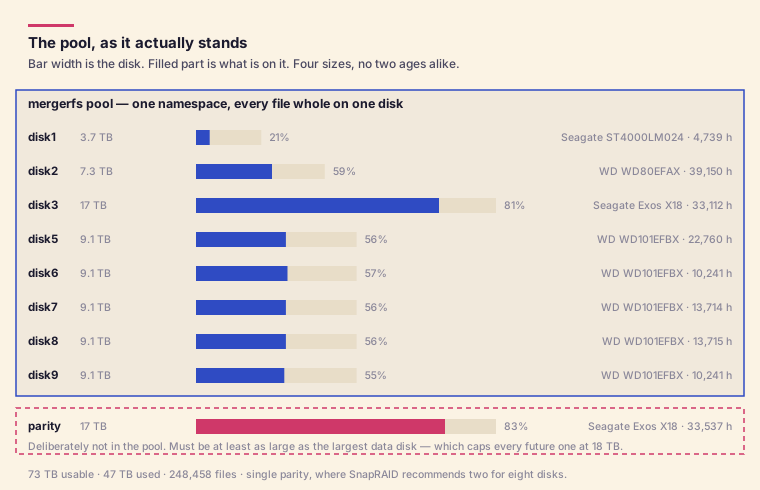
Four sizes — 4, 8, 10 and 18 TB — and two of those drives were bought used with roughly 33,000 hours already on them. In a RAID5 world none of that is expressible.
The file distribution shows what “most free space” does over time: disk3 holds 19,139 files in 14 TB, because it was the emptiest disk when the large 4K files landed. disk9 holds 91,857 files in 5 TB. Same pool, completely different content, and neither was planned.
Getting there without a backup
There was no second copy of 32 TiB to restore from, so the migration had to be done such that the source stayed intact and authoritative until the destination was verified.
The pool was seeded with the two disks not in the RAID5 — the 4 TB and the 8 TB — as mergerfs only, no parity. Then the media was copied onto it over the network while the array stayed live and in use, rsync capped at 200 MB/s and running under nice -n19 ionice -c2 -n7 so streaming stayed smooth. The contention was the RAID5 doing the reading, not the NAS doing the writing.
The copy ran on the source machine under setsid, detached, with a monitor loop writing a report to disk every 30 minutes. My laptop was irrelevant to it — I could close it, leave, and read the report later.
Writers were frozen only for the final delta pass and the cutover. Once the destination was verified a superset of the source, the clients were repointed. The RAID5 was left fully intact as the rollback and only dismantled a day later, once the pool had carried real traffic. Its five disks were then wiped and added to the pool — which is the part that could not have happened in the other order.
The last step was flipping one of the two 18 TB drives from data to parity, once the reclaimed disks had absorbed enough that it could be drained.
Three things I got wrong or would warn about
SnapRAID thinks this array should have two parity disks. It says so on every run: WARNING! For 8 disks, it's recommended to use two parity levels. It is right. One parity disk survives one failure, and eight drives with a median age over three years is a lot of surface. Second parity costs another 18 TB drive and I have not bought it yet.
30% of the array is currently unscrubbed, with the oldest block last verified 56 days ago. A monthly full scrub was removed from cron because it ran for days and hammered the disks, and it has not been replaced with an incremental schedule. Parity that is never verified is a belief, not a backup.
The parity disk sets a ceiling nobody mentions. It must be at least as large as the largest data disk, forever. The 18 TB parity drive means no future data disk can exceed 18 TB without buying a new parity drive first. Buying the biggest available drive as data quietly costs you a second drive of the same size.
Everything above is a media library only. Configs, databases and anything with an open file handle live on different storage with real-time redundancy and actual backups. SnapRAID would not protect them, and the exclusion list says so directly: usenet scratch, *.part, SQLite journals and write-ahead logs, and the restic repository all sit outside parity.